What is 802.1X Authentication?
802.1X is an IEEE standard for port-based Network Access Control (PNAC). It is a protocol that enables users and/or devices to be uniquely identified before accessing the network and being given authorized levels of access to a local area network (LAN) or wireless area network (WLAN).
802.1X authentication ensures devices interfacing with the system are what they claim to be, blocking supplicant traffic (clients) at an interface until credentials are presented to an authentication server, or RADIUS server, and authorized.
The number of attacks targeting enterprise wired and wireless networks increases daily. Exploits such as Man-in-the-Middle attacks targeting credentials, spanning tree protocol attacks, and ARP attacks are surprisingly easy to perpetrate against networks that don’t utilize sufficient security.

In a nutshell, 802.1X authentication addresses these vulnerabilities by requiring devices to access a wired or wireless network with their own unique set of credentials or even certificates rather than using a single password for all access.
An 802.1X network differs from home networks in one major way: every device that connects has a unique form of validating its identity, rather than all sharing the same Wi-Fi password. 802.1x can do this by utilizing a RADIUS server (also known as an AAA server), whose sole purpose is checking a user’s credentials to see if they are an active member of the organization and, depending on the network policies, grants users varying levels of access to the network. This allows unique credentials or certificates to be used for each user or device instead of relying on a shared network password.. It’s much more secure than using a single password to gate network access and is widely considered the gold standard for both wired and wireless network security.
However, there are a lot of misconceptions about 802.1X, including how to deploy it, what it’s used for, and whether it’s even necessary. In this guide, we’ll share with you our own data regarding these misconceptions and explain why 802.1X is still vital to securing modern organization networks.
What Are the Main Components of 802.1X?
There are three main components of 802.1X authentication:
1. Supplicant: The Client User
A supplicant is a part of a device seeking access to an 802.1X network. The supplicant initiates authentication by sending Extensible Authentication Protocol over LAN (EAPOL) messages to the authenticator. , collecting the user credentials in a way that satisfies 802.1X.
2. Authenticator: The Access Point
An authenticator detects when a supplicant seeks access to the network.The authenticator controls the network port and relays authentication messages between the client and the authentication server. . Ethernet switches, network access servers, and wireless access points all serve as authenticators.
3. Authentication Server: The RADIUS Gateway
Authentication servers, or a Remote Authentication Dial-in User Service (RADIUS) server, receives and responds to access requests. If authentication succeeds, the authenticator changes the port state from unauthorized to authorized, allowing normal network traffic.
How Does 802.1X Authentication Work?
802.1X authentication only gives devices access to the protected side of a network after authenticating them. It does so by opening ports for network access once the RADIUS server verifies the device identity. The RADIUS server, in turn, communicates with the organization’s directory, which is often done through LDAP, SAML, or OAuth protocols.
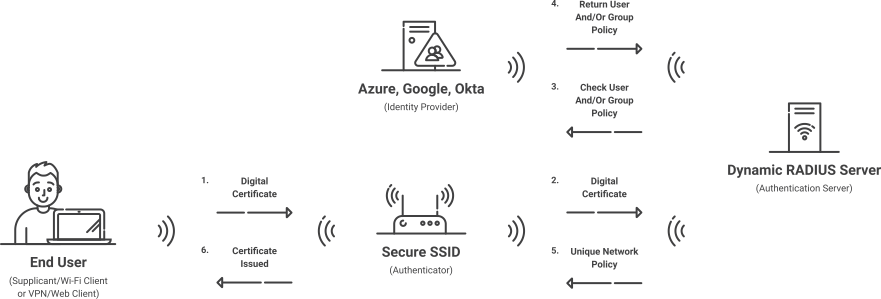
The 802.1X authentication process takes four steps: Initialization, initiation, negotiation, and authentication.
- Initialization
The Initialization step starts when the authenticator detects a new device and attempts to establish a connection. The authenticator port is set to an “unauthorized” state, meaning that only 802.1X traffic will be accepted and every other connection will be dropped. - Initiation
The client typically begins authentication by sending an EAPOL-Start message, after which the authenticator sends an EAP-Request/Identity message.. The response usually contains a way to identify the new device. The authenticator received the EAP response and relays it to the authentication server in a RADIUS access request packet. - Negotiation
Once the authentication server receives the request packet, it will respond with a RADIUS access challenge packet containing the approved EAP authentication method for the device. The authenticator will then pass on the challenge packet to the device to be authenticated. - Authentication
Once the EAP method is configured on the device, the authentication server completes the EAP authentication exchange and sends either a RADIUS Access-Accept or Access-Reject message.. Once the process is complete, the port will be set to “authorized” and the device is configured to the 802.1X network. - Accounting
802.1X RADIUS accounting involves recording the information of devices that are authenticated to the 802.1X network and the session duration. The device information, usually the MAC address and port number, is sent in a packet to the accounting server when the session begins. The server will receive a message signaling the end of the session. While it isn’t one of the four steps in the 802.1X authentication process, we get a lot of questions about accounting, as RADIUS Servers are often referred to as AAA (Authentication, Authorization, Accounting) servers.
What is 802.1X Authentication Used For?
802.1X is used for secure network authentication. If you are an organization dealing with valuable and sensitive information, you need a secure method of transporting data. 802.1X authentication achieves this for wired and wireless networks by enabling much more secure mechanisms for validating the users/devices requesting network access. It was historically only used by large organizations like enterprises, universities, and hospitals, but is rapidly becoming adopted by smaller businesses because of the growing threats in cyber security. Today, we see it in organizations of all sizes and verticals, from large corporate settings to universities.
Many organizations are legally required to use 802.1X. NIST SP 800-171 3.5.2 requires any organization that does federal research to use 802.1X with EAP-TLS to ensure that only trusted devices use the network. K-12 schools rely on it to keep students and staff on separate networks so they can filter internet content available to students, a requirement for receiving funding from the government.
WPA2-Enterprise uses 802.1X and EAP to authenticate users and devices on Wi-Fi networks.. In contrast, the Pre-Shared Key (PSK) network security most often used at home is referred to as WPA2-Personal. WPA2-Personal is not sufficient for any organization dealing with sensitive information and can put organizations at serious risk for cyber crimes.
To learn more about how solutions from SecureW2 simplify compliance and harden security, schedule a demo here.
How Secure is 802.1X Authentication?
When used correctly, 802.1X authentication is the gold standard of network authentication security. It can prevent over-the-air credential theft attacks like Man-in-the-Middle attacks and Evil Twin proxies. It is much more secure than WPA2 or even WPA3 Pre-Shared Key networks, which are typically used in personal networks.
However, 802.1X security can vary greatly depending on two factors.
- Configuration: The first variable occurs if end users are left to manually configure their devices. The configuration process requires high-level IT knowledge to understand, and if one step is incorrect, they are left vulnerable to credential theft. We highly recommend using dedicated 802.1X onboarding software instead.
- Credential-based authentication vs. certificate-based authentication: Certificate-based EAP-TLS significantly reduces an organization’s risk for credential theft and is the most secure way to use 802.1X. Not only does it stop credentials from being sent over the air where they can be easily stolen, but it forces users to go through an enrollment/onboarding process that ensures their devices are configured correctly.
The Components of 802.1X
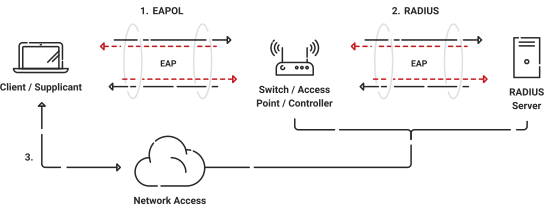
There are just a few components needed to make 802.1X authentication work: client, access point/switch, RADIUS server, and identity provider. Realistically, if you already have access points and some spare server space, you possess all the hardware needed to make secure wireless happen. Sometimes you don’t even need the server; some access points come with built-in software that can operate 802.1X (though only for the smallest of small deployments).
Client / Supplicant
In order for a device to participate in the 802.1X authentication, it must have a piece of software called a supplicant installed in the network stack. The supplicant is necessary as it will participate in the initial negotiation of the EAP transaction with the switch or controller and package up the user’s credentials in a manner compliant with 802.1X. If a client does not have a supplicant, the EAP frames sent from the switch or controller will be ignored and the switch will not be able to authenticate.
Fortunately, most operating systems going back 10-15 years have 802.1X support built in. In IoTs (including game consoles, entertainment devices, and printers), 802.1X support is still lacking but is beginning to catch up. SecureW2 provides an 802.1X supplicant for devices that don’t have one natively. Generally speaking, these devices should be less than 10% of the devices on your network and are best treated as the exception rather than the focus.
Switch / Access Point / Controller
The switch or wireless controller plays an important role in the 802.1X transaction by acting as a ‘broker’ between the client device and the authentication server. Until authentication succeeds, the client has no network connectivity beyond the switch, meaning all 802.1X exchange traffic occurs only between the client and the switch/controller.
The client typically initiates authentication by sending an EAPOL-Start message to the switch or controller.. The client’s responses are forwarded to the correct RADIUS server based on the configuration in the Wireless Security Settings. When the authentication is complete, the switch/controller makes a decision whether to authorize the device for network access based on the user’s status and possibly the attributes contained in the Access_Accept packet sent from the RADIUS server.
If the RADIUS server sends an Access_Accept packet as a result of an authentication, it may contain certain attributes that provide the switch with information on how to connect the device on the network. Common attributes will specify which VLAN to assign a user to, or possibly a set of ACLs (Access Control Lists) the user should be given once connected. This is commonly called ‘User Based Policy Assignment’ as the RADIUS server is making the decision based on user credentials. Common use cases would be to push guest users to a ‘Guest VLAN’ and employees to an ‘Employee VLAN’.
RADIUS Server
The RADIUS server acts as the “security guard” of the network; as users connect to the network, the RADIUS authenticates their identity and authorizes them for network use. A user becomes authorized for network access after successfully authenticating through the configured EAP method. . Each time the user connects, the RADIUS confirms they have the correct certificate or credentials and prevents any unapproved users from accessing the network.
A key security mechanism to employ when using a RADIUS is server certificate validation. This guarantees that the user only connects to the network they intend to by configuring their device to confirm the identity of the RADIUS by checking the server certificate. If the certificate is not the one which the device is looking for, it will not send a certificate or credentials for authentication. This prevents users from falling victim to an Evil Twin proxy attack.
RADIUS servers can also be used to authenticate users from a different organization. Solutions like Eduroam use RADIUS servers as proxies (such as RADSEC). If a student visits a neighboring university, the RADIUS server can authenticate their status at their home university and grant them secure network access at the university they are currently visiting.
Why Does 802.1X Need a RADIUS Server?
802.1X needs a RADIUS server because there needs to be a dedicated server to verify credentials. The server checks the directory of authorized users to confirm whether or not the client has permission to access the network and passes that information back to the controller/access point. Without a RADIUS server, authentication would have to occur at the access point (this would require some pretty powerful APs), such as in the case of Pre-Shared Key authentication.
Schedule a demo to see the SecureW2 Cloud RADIUS in action
Common Myths About 802.1X
Myth #1: 802.1X is Only for Wireless Networks
There is a misconception that 802.1X only really benefits wireless networks. After all, if you’re not transmitting credentials over-the-air to connect to a wired network, why would you need additional security?
But 802.1X is just as relevant for wired networks as wireless ones. Relying on credentials for authentication at all can leave you vulnerable because those credentials can be shared or easily stolen.
You need to be certain that the devices plugging into your ethernet are the ones you want there. By configuring 802.1X with your Ethernet ports, any device that plugs in a cable will be prompted for an 802.1X network profile. This allows organizations to leave ethernet cables out for wired network access, without being worried that an attacker might abuse them.
Myth #2: Credentials / MAC Addresses Are Enough to Identify Devices
We’ve also seen organizations argue that, as long as they only allow managed devices on the network, usernames and passwords are sufficient. This couldn’t be more false for the reasons we outlined above.
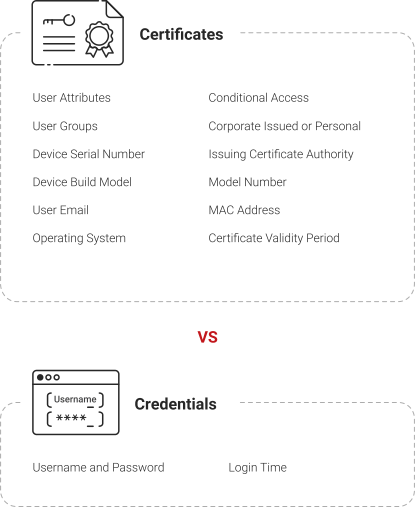
Even if your organization doesn’t have a BYOD policy, usernames and passwords aren’t locked to specific devices. Anyone can use them as long as they know what they are. Sure, 802.1X improves your network security, but even a RADIUS server can’t give administrators any real certainty about the people and devices accessing your network if you’re using passwords.
Another common argument is that if you gate network access by MAC address, only allowing specific MAC addresses on the network, then that’s enough. The issue with this is that many devices will report a randomized MAC address every time they connect to a network to prevent tracking a user across different networks. While this supports end-user privacy, it means that administrators can’t rely on MAC address authentication alone.
The solution to this conundrum is digital certificates. Digital certificates, unlike passwords, are issued uniquely to a device’s hardware (TPM / Secure Enclave) and can be configured to be non-exportable. They cannot be transferred or shared, giving administrators much more certainty over the people on your network. Certificates also contain detailed templates that can provide organizations with much more information about individual users, including their operating system, their MDM, their location, and much more.
Myth #3: Network Security Doesn’t Matter if all Your Resources are in the Cloud
A common question we get from organizations is: why should I care about network security when all my resources are in the cloud? In other words, why should you secure your local network resources, if all of the important stuff – such as your Identity Infrastructure, applications, and device management systems – are in the cloud?
Network security still matters even in a world that’s increasingly cloud-based. There are a number of attacks that hackers can conduct once they’ve penetrated your network, such as Address Resolution Protocol (ARP) attacks, Spanning Tree Protocol (STP) attacks, and more. Once a malicious actor has gained access to your network, they can also easily harvest credentials where you use them and leverage those for access to sensitive resources.
Your network, put simply, is like a door. It may just be the starting point, but it can lead to a lot of damage if you don’t secure it properly.
Benefits of Moving to 802.1X
There are three main benefits of making the switch to 802.1X: increased network security, simplified wireless connectivity, and compliance with regulatory standards.
Increased Network Security With 802.1X and Certificates
802.1X is a step-up in security from traditional pre-shared key (PSK) networks, which end-users access by entering a single common password. It requires individual users and devices to each have their own set of credentials to log in with, giving network administrators much more control and enhanced visibility over who’s logging in.
However, 802.1X is even more secure when you tie it to digital certificates. Digital certificates are made from templates that contain a plethora of information about the users and devices using them. Whereas a username/password only shows you the username/password being used (since they can be shared), a certificate can show you so much more, including the operating system, MDM (if applicable), role, location, and user email address.
Simplified Wired & Wireless Connectivity
We’ve established above how 802.1X, especially when paired with the iron-clad authentication offered by a PKI, improves network security. What we haven’t touched on yet is that it doesn’t just improve security – it can make connecting to your network even simpler for your end-users. This might seem counterintuitive; generally, when you make things more secure, you require more from your end-users, resulting in a more complicated login process.
But 802.1X can actually make things easier. Separate logins for each individual user and device means that when there’s a password change for any one of them, it only applies to that individual. However, if you’re using PSK – a single password for the entire network – changing the password means disconnecting all devices on that network.
Things get even easier when you add certificate-based authentication to the mix. You no longer have to require specific, complex password requirements for network access. Users can connect just by using their certificates, which can be tied to your MDM or Identity Provider. Furthermore, because certificates can be encoded with information from your Identity Provider, they can be used to apply access policies automatically. For example, you could have users from different departments automatically segmented into their own VLANs when they authenticate to your network.
Meeting Regulatory Requirements
Standards are rising across the board for enterprises in light of the increasing complexity of cyber-attacks. One example is the National Institute of Standards and Technology’s (NIST) requirement 3.5.2, which states that organizations must verify the identities of both users and devices prior to granting them access to systems.
Usernames and passwords alone make this impossible. They can be easily stolen, and even if they’re not, users may sometimes share them with others. Moving to 802.1X (especially with certificates) helps enterprises to meet tightened regulatory guidelines like those provided by NIST.
3 Reasons Enterprises Are Moving to 802.1X
High-Profile Attacks have Raised Awareness of Network Security
It seems like every other day, we’re faced with news of another data breach or an organization being targeted by hackers.
One of the most unquantifiable results of these attacks is the significant loss in reputation faced by the organizations that were breached. Prospective customers lose trust in organizations that didn’t have the ability to protect their sensitive information from cybercriminals.
Increased network security continues to be the top reason we see customers deploying 802.1X. A big part of this desire for ironclad security comes from enterprises wanting to preserve their customers’ trust by protecting themselves from breaches.
Decreasing Support for Network Policy Server (NPS), Credential Guard Raising Standards
Windows Credential Guard can protect sensitive user credentials on Windows devices through hashes and various hardware security mechanisms. Wider use of Windows Credential Guard, along with a steadily decreasing support for NPS, makes the very common legacy setup of NPS, Active Directory, and PEAP-MSCHAPv2 a bad end-user experience and a significant amount of work to manage day-to-day. In an increasingly cloud-based world where organizations are moving critical infrastructure, such as their identity management, to the cloud, it’s vital that their RADIUS also supports cloud functionality.
For years, one issue we’ve heard from many customers is that they want to move much of their infrastructure to the cloud. If you’re using Azure AD/Entra ID, this means you can’t stick with legacy solutions like NPS anymore for 802.1X – you need a cloud-based RADIUS server such as Cloud RADIUS.
Awareness of Cloud and Managed Alternatives to Traditionally On-Premise Solutions is Growing
Historically, the components necessary for 802.1X (especially the RADIUS server) were constructed and maintained day-to-day on-premise. While we still speak with many organizations that continue to have physical authentication servers on-site, our discussions show us that there’s a growing awareness of cloud-based alternatives.
Increasingly, administrators and security professionals understand that RADIUS and PKI don’t need to be handled on-premise. In fact, it’s generally easier, less costly, and less time-consuming to use managed services. We’ve heard a recurring sentiment that the more a security professional knows about PKI, the less they want to handle it themselves. And little wonder – this research by Spectre Ops shows just how challenging managing your own can be.
FAQs About 802.1X
What is 802.1X EAP Security?
The standard authentication protocol used on encrypted networks is Extensible Authentication Protocol (EAP), which protects credentials transmitted over-the-air from client to server through a tunnel. 802.1X is the standard that is used for passing EAP over wired and wireless Local Area Networks (LAN).
The EAP protocol can be configured for credential (EAP-TTLS/PAP and PEAP-MSCHAPv2) and digital certificate (EAP-TLS) authentication. Not all EAP tunnels are equal, though, and Man-in-the-Middle attacks can easily intercept usernames and passwords sent over-the-air if weaker protocols are used.
| WPA2 & WPA3 Enterprise Common Protocols | Level of Encryption | Authentication Speed | Directory Support | Credentials |
|---|
| EAP-TLS | Public-Private Key Cryptography | Fast – 12 steps | Universal | Passwordless |
| PEAP-MSCHA Pv2 | Bad encryption (MD4, compromised since 1995) | Slow – 22 steps | Active directory | Passwords |
| EAP-TTLS/PAP | No credential encryption | Slowest – 25 steps | Active directory | Passwords |
Are IEEE 802.1X and Wi-Fi the Same?
Almost. The IEEE 802.1X standard was first designed for use in wired Ethernet networks. Wi-Fi refers to networking standards based on IEEE 802.11. These networks can use 802.1X authentication when operating in enterprise security modes. .
That being said, most security and networking professionals use the term 802.1X for both wired and wireless networks if they are using WPA2-Enterprise security.
What is Wired 802.1X?
Authenticating a wired network connection for 802.1X is a similar process to wireless. The wired network user must connect to the secure network from their device and present a signed certificate or valid credentials to authenticate their identity.
The primary difference is instead of establishing a secure connection with a wireless switch, your device must be eEthernet connected and authenticate to an 802.1X-capable switch. The device and RADIUS server establish trust over the wired connection and if the user is recognized, they will be authorized for secure network use.
Is 802.1X Encrypted?
Supplicants initiate connections by establishing an Extensible Authentication Protocol (EAP) transaction between supplicant and the control
802.1X itself does not provide encryption. It is an authentication framework used by Wi-Fi security protocols such as WPA2-Enterprise and WPA3-Enterprise, which provide encryption.802.1X WPA is generally reserved for personal networks, such as your home Wi-Fi, and runs on RC4-based TKIP (Temporal Key Integrity Protocol) encryption. It’s less secure than WPA2, but usually sufficient for home use. WPA-Personal uses a pre-shared key (PSK), while WPA-Enterprise uses 802.1X authentication.
802.1X WPA2 could utilize TKIP, but generally chooses AES (Advanced Encryption Standard), which is the most secure standard available. It is a little more difficult and costly to set up however, so it’s used in higher-stake environments like businesses.
What Are the Vulnerabilities in 802.1X?
No security protocol is invulnerable, and 802.1X is not an exception.
Wireless 802.1X’s most common configurations are WPA-PSK (pre-shared key, also called WPA-Personal) and WPA or WPA2 Enterprise.
PSK is the simplest and the most vulnerable. A password is configured on the access point and distributed to users of the network. It’s intended for personal use, mostly in homes. It’s easily cracked with a run-of-the-mill brute force attack, and is also susceptible to all other common attacks.
PEAP MSCHAPv2 was once the industry standard for WPA2-Enterprise networks, but it’s been cracked. There are still many organizations using this standard, despite the inherent vulnerabilities to over-the-air attacks.
EAP-TTLS/PAP can be vulnerable if server certificate validation is not properly configured, allowing attackers to intercept authentication through rogue access points. It’s particularly weak because credentials are sent in clear text, so it’s a simple matter for hackers to intercept and steal. Further exacerbating the problem is the rising popularity of Cloud RADIUS servers. Many of them only support EAP-TTLS/PAP, so end users are forced to send their credentials in clear text over the internet.
The strongest WPA2-Enterprise standard is EAP-TLS. It relies on the asymmetrical cryptography of digital certificates for authentication, which renders it immune to over-the-air attacks. Even if a hacker intercepts the traffic, they will only harvest one half of the public-private key pair – which is useless without the other half.
Click here for more details on the steely defenses offered by EAP-TLS.
What Are the Directory Requirements for 802.1X Authentication?
802.1X traditionally requires a directory (on-prem or cloud) so the RADIUS can communicate to identify each user and what level of access they are allowed.
The Identity Store is where usernames and passwords are stored. In most cases, this is Active Directory or potentially an LDAP server. Most RADIUS servers can integrate with Active Directory or LDAP directories to validate user credentials during authentication. . There are a few caveats when LDAP is used, specifically around how the passwords are hashed in the LDAP server. If your passwords are not stored in cleartext or an NTLM hash, you will need to choose your EAP methods carefully as certain methods may not be compatible, such as EAP-PEAP. These limitations typically arise from how credentials are stored in the directory rather than from the RADIUS server itself..
SecureW2 can integrate with identity providers using SAML during the device onboarding or enrollment process, allowing organizations to authenticate users before issuing certificates or network configuration profiles. .
- To set up SAML authentication within Google Workspace, click here.
- Configuring WPA2-Enterprise with Okta, click here.
- For a guide on SAML Authentication using Shibboleth, click here.
- To configure WPA2-Enterprise with ADFS, click here.
Developing a robust WPA2-Enterprise network requires additional tasks, such as setting up a PKI or CA (Certificate Authority) and seamlessly distributing certificates to users. But contrary to what you might think, many organizations can implement these upgrades using existing network infrastructure, provided their access points, switches, and RADIUS servers support 802.1X.. For example, rolling out guest access or changing the authentication method can be accomplished without additional infrastructure.
How Do I Configure 802.1X Authentication on Devices?
Configuring 802.1X authentication or WPA-2 Enterprise on a device is much more difficult than the WPA2-PSK networks we have at home. There are a handful of settings that the average end-user doesn’t understand. We’ve helped millions of devices connect to 802.1x networks, so we will break down how it works for each operating system.
Configure 802.1X on Windows
You can configure 802.1X on Windows OS devices in two ways: manually, or with device onboarding software.
- Manually: Manually configuring a Windows device requires the user to set up a new wireless network, enter a network name, set the security type, adjust network settings, set the authentication method, and many more steps. While it’s certainly possible to complete this process accurately, it is highly complex and much more difficult than an onboarding software designed for efficiency.
- With device onboarding software:The process for configuring Windows OS with SecureW2 requires the user to connect the onboarding SSID and open an internet browser. The user is sent to SecureW2’s JoinNow onboarding software. After clicking JoinNow, a graphic will indicate the progress of the configuration. The user will then be prompted to enter their credentials and the device will be authenticated and equipped with a certificate.
Configure 802.1X on macOS
For macOS, you can either manually configure or employ onboarding software to set up 802.1X.
- Manually: In order to manually configure macOS, the end user needs to know how to create an enterprise profile, install a client security certificate, verify the certificate, and adjust the network settings. The process isn’t too difficult for someone with a background in IT, but it is risky for the average network user because of the high-level technical information involved with each step.
- With device onboarding software:Downloading the SecureW2 JoinNow Suite for macOS enables automation so end users are not required to complete the process. The setup is similar to Windows OS; the end user starts by connecting to the onboarding SSID and opens a browser. After downloading the .DMG file and entering their credentials, the configuration process begins. The entire configuration and authentication requires only a few steps, allowing the end user to sit back while the device configures.
Configure 802.1X on Android
You are able to configure your Android for 802.1X in two ways: manually through the Wi-Fi settings or with device onboarding software.
- Manually: Configuring manually via Wi-Fi settings requires you to create a network profile, configure Server Certificate Validation (which requires uploading the CA used on the RADIUS Server and the common name), and configuring the authentication method.
- With device onboarding software: An application downloaded from the Play Store will complete all these steps and configure your organization’s network settings for you.
Configure 802.1X on iOS
Configuring 802.1X authentication for iPhones requires you to either manually configure the device or use onboarding software.
- Manually: Manual configuration means you need to create a network profile in the Wi-Fi settings and configure Server Certificate validation and the authentication method.
- With device onboarding software: SecureW2 can push a mobile config file to an iPhone device and configure the network settings automatically.
Configure 802.1X on Linux
Like other operating systems, there are two methods to configure 802.1X on Linux.
The manual configuration is relatively simple. Open up Network Manager, select Edit Connections, find your access point and click Edit. A new window will open up, choose the tab that says 802.1X settings and input the information of your network.
For one device, this is a straightforward process. If you need to onboard many devices (and users), you need SecureW2’s automatic device onboarding software. Click here to learn more.